
- gf24160 的博客
可自定义的网页点击 +easyX库
-
 gf24160
LV 6
@
2025-12-17 18:40:34
gf24160
LV 6
@
2025-12-17 18:40:34
食用前请在代码存放处新建一个叫http.txt的文件,具体写法如下不要有www.!!!
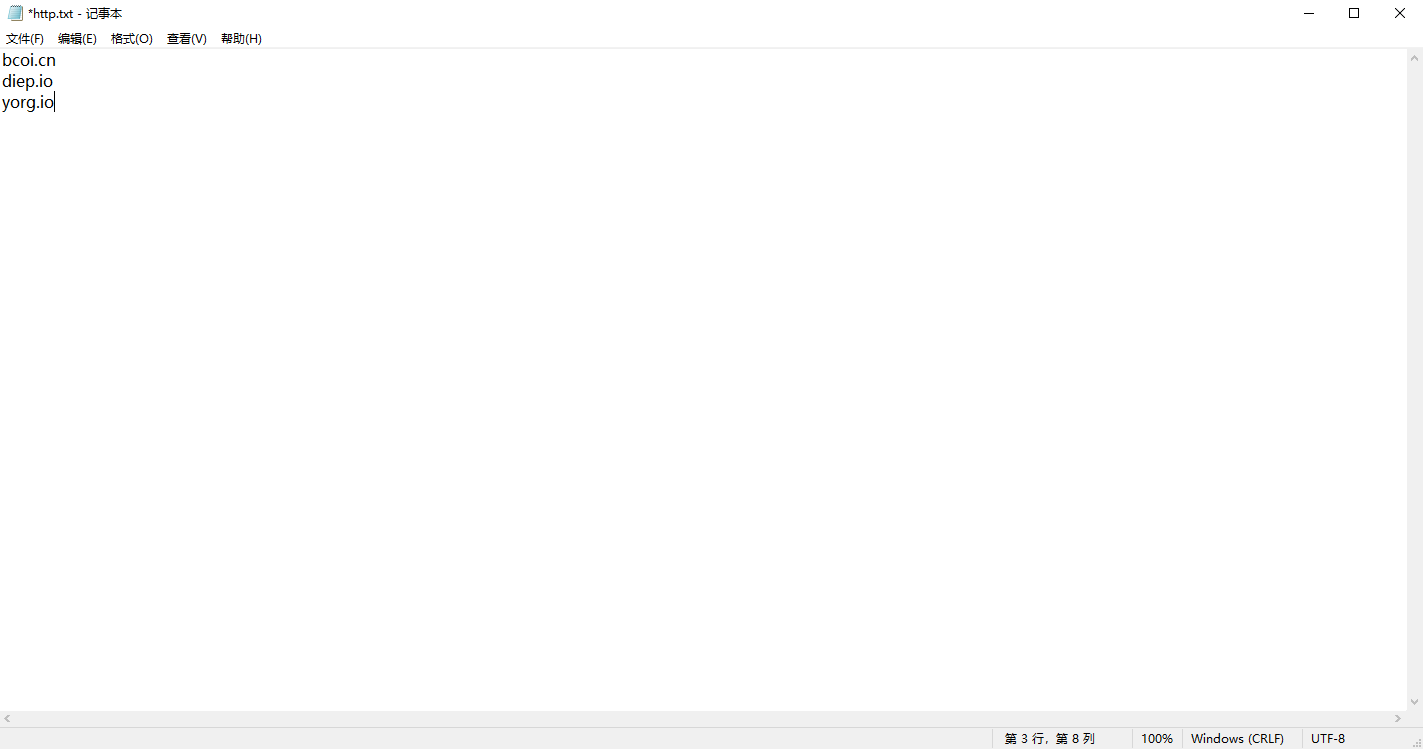 其实也可以不要有自带的
点击直接下载
其实也可以不要有自带的
点击直接下载
要加easyX库要不然会中毒
#include <graphics.h>
#include <conio.h>
#include <stdio.h>
#include <time.h>
#include <cmath>
#include <vector>
#include <algorithm>
#include <string>
#include <thread>
#include <chrono>
#include <iostream>
#include <fstream>
#include <Windows.h>
using namespace std;

// 颜色定义结构体
struct ColorTheme {
    COLORREF primary = RGB(72, 119, 199);      // 主蓝色
    COLORREF secondary = RGB(64, 156, 255);    // 亮蓝色
    COLORREF accent = RGB(85, 196, 106);       // 成功绿色
    COLORREF warning = RGB(240, 173, 78);      // 警告橙色
    COLORREF danger = RGB(217, 83, 79);        // 危险红色
    COLORREF background = RGB(248, 249, 250);  // 浅灰背景
    COLORREF card = RGB(255, 255, 255);        // 卡片白色
    COLORREF text = RGB(52, 58, 64);           // 深灰文字
    COLORREF lightText = RGB(108, 117, 125);   // 浅灰文字
    COLORREF border = RGB(233, 236, 239);      // 边框色
    COLORREF hover = RGB(240, 245, 255);       // 悬停浅蓝
    COLORREF shadow = RGB(233, 236, 239);      // 阴影颜色
} theme;

struct Website {
    string url;
};

vector<Website> websites(1000);
int totalWebsites = 0, currentPage = 0;
int hoverIndex = -1;
bool mousePressed = false;
int windowWidth = 800, windowHeight = 900;  // 放大窗口尺寸
int mouseX = 0, mouseY = 0;

// 绘制现代风格按钮
void drawModernButton(int x, int y, int width, int height, string text,
                     COLORREF color, bool hover = false, bool pressed = false) {

    // 根据状态调整颜色
    COLORREF bgColor = color;
    COLORREF textColor = RGB(255, 255, 255);
    COLORREF borderColor = color;

    if (pressed) {
        // 按下状态 - 颜色加深
        bgColor = RGB(GetRValue(color) * 0.8, GetGValue(color) * 0.8, GetBValue(color) * 0.8);
        borderColor = bgColor;
    } else if (hover) {
        // 悬停状态 - 添加发光效果
        bgColor = RGB(min(GetRValue(color) + 30, 255),
                     min(GetGValue(color) + 30, 255),
                     min(GetBValue(color) + 30, 255));

        // 绘制发光效果
        setlinecolor(RGB(min(GetRValue(color) + 60, 255),
                        min(GetGValue(color) + 60, 255),
                        min(GetBValue(color) + 60, 255)));
        setlinestyle(PS_SOLID, 2);
        roundrect(x-2, y-2, x + width + 2, y + height + 2, 12, 12);
        setlinestyle(PS_SOLID, 1);
    }

    // 绘制按钮主体(圆角矩形)
    setfillcolor(bgColor);
    solidroundrect(x, y, x + width, y + height, 10, 10);

    // 绘制边框
    setlinecolor(borderColor);
    setlinestyle(PS_SOLID, 2);
    roundrect(x, y, x + width, y + height, 10, 10);

    // 绘制左侧图标框
    setfillcolor(RGB(255, 255, 255));
    setlinecolor(RGB(255, 255, 255));
    solidrectangle(x + 15, y + 15, x + height - 15, y + height - 15);

    // 绘制图标(网站首字母)
    if (!text.empty()) {
        // 绘制左侧字母图标
        string icon = text.substr(0, 1);
        // 将std::string转换为LPCSTR(const char*)
        const char* icon_cstr = icon.c_str();

        settextcolor(color);
        settextstyle(height * 0.4, 0, "Arial");
        setbkmode(TRANSPARENT);

        int iconWidth = textwidth(icon_cstr);
        int iconHeight = textheight(icon_cstr);
        outtextxy(x + (height/2) - iconWidth/2, y + (height - iconHeight)/2, icon_cstr);
    }

    // 绘制按钮文字(截断过长的文本)
    string displayText = text;
    if (text.length() > 20) {
        displayText = text.substr(0, 17) + "...";
    }

    // 将std::string转换为LPCSTR
    const char* displayText_cstr = displayText.c_str();

    settextcolor(RGB(255, 255, 255));
    settextstyle(height * 0.35, 0, "微软雅黑");
    setbkmode(TRANSPARENT);

    int textWidth = textwidth(displayText_cstr);
    int textHeight = textheight(displayText_cstr);

    // 文字位置(在图标右侧)
    outtextxy(x + height + 10, y + (height - textHeight) / 2, displayText_cstr);

    // 绘制右侧箭头图标
    settextstyle(height * 0.4, 0, "Webdings");
    settextcolor(RGB(255, 255, 255));
    outtextxy(x + width - 40, y + (height - textHeight) / 2, "8");
}

// 绘制页面指示器
void drawPageIndicator(int currentPage, int totalPages) {
    int indicatorWidth = 300;
    int indicatorHeight = 50;
    int x = (windowWidth - indicatorWidth) / 2;
    int y = windowHeight - 80;

    // 背景
    setfillcolor(theme.card);
    solidroundrect(x, y, x + indicatorWidth, y + indicatorHeight, 25, 25);

    // 边框
    setlinecolor(theme.border);
    setlinestyle(PS_SOLID, 2);
    roundrect(x, y, x + indicatorWidth, y + indicatorHeight, 25, 25);

    // 当前页码
    settextcolor(theme.primary);
    settextstyle(24, 0, "微软雅黑");
    setbkmode(TRANSPARENT);

    char pageText[50];
    sprintf(pageText, "%d", currentPage + 1);

    int textWidth = textwidth(pageText);
    int textHeight = textheight(pageText);
    outtextxy(x + 30, y + (indicatorHeight - textHeight) / 2, pageText);

    // 分隔线
    setlinecolor(theme.border);
    line(x + 80, y + 15, x + 80, y + indicatorHeight - 15);

    // 总页数
    settextcolor(theme.lightText);
    settextstyle(18, 0, "微软雅黑");

    char totalText[50];
    sprintf(totalText, "/ %d", totalPages);
    outtextxy(x + 100, y + (indicatorHeight - textHeight) / 2, totalText);

    // 进度条
    int progressWidth = 150;
    int progressX = x + indicatorWidth - progressWidth - 30;
    int progressY = y + indicatorHeight / 2 - 6;

    // 进度条背景
    setfillcolor(theme.border);
    solidroundrect(progressX, progressY, progressX + progressWidth, progressY + 12, 6, 6);

    // 进度条填充
    if (totalPages > 0) {
        int fillWidth = progressWidth * (currentPage + 1) / totalPages;
        setfillcolor(theme.primary);
        solidroundrect(progressX, progressY, progressX + fillWidth, progressY + 12, 6, 6);
    }
}

// 绘制翻页按钮
void drawPageButtons() {
    int totalPages = (totalWebsites + 9) / 10;

    // 上一页按钮
    int prevX = 100;
    int prevY = windowHeight - 150;
    int buttonWidth = 150;
    int buttonHeight = 50;

    bool prevHover = (mouseX >= prevX && mouseX <= prevX + buttonWidth &&
                     mouseY >= prevY && mouseY <= prevY + buttonHeight);

    setfillcolor(prevHover ? RGB(72, 119, 199) : RGB(108, 117, 125));
    solidroundrect(prevX, prevY, prevX + buttonWidth, prevY + buttonHeight, 10, 10);

    settextcolor(RGB(255, 255, 255));
    settextstyle(22, 0, "Webdings");
    setbkmode(TRANSPARENT);
    outtextxy(prevX + 20, prevY + 12, "3");

    settextstyle(20, 0, "微软雅黑");
    outtextxy(prevX + 50, prevY + 15, "上一页");

    // 下一页按钮
    int nextX = windowWidth - 250;
    int nextY = windowHeight - 150;

    bool nextHover = (mouseX >= nextX && mouseX <= nextX + buttonWidth &&
                     mouseY >= nextY && mouseY <= nextY + buttonHeight);

    setfillcolor(nextHover ? RGB(72, 119, 199) : RGB(108, 117, 125));
    solidroundrect(nextX, nextY, nextX + buttonWidth, nextY + buttonHeight, 10, 10);

    settextstyle(22, 0, "Webdings");
    setbkmode(TRANSPARENT);
    outtextxy(nextX + buttonWidth - 40, nextY + 12, "4");

    settextstyle(20, 0, "微软雅黑");
    int nextTextWidth = textwidth("下一页");
    outtextxy(nextX + buttonWidth - 40 - nextTextWidth - 10, nextY + 15, "下一页");
}

// 绘制页脚
void drawFooter() {
    int footerHeight = 50;
    int footerY = windowHeight - footerHeight;

    // 渐变背景
    for (int i = 0; i < footerHeight; i++) {
        float ratio = (float)i / footerHeight;
        COLORREF gradientColor = RGB(
            72 + (52-72) * ratio,
            119 + (58-119) * ratio,
            199 + (64-199) * ratio
        );
        setlinecolor(gradientColor);
        setfillcolor(gradientColor);
        solidrectangle(0, footerY + i, windowWidth, footerY + i + 1);
    }

    // 版权信息
    settextcolor(RGB(255, 255, 255));
    settextstyle(16, 0, "微软雅黑");
    setbkmode(TRANSPARENT);

    char info[100];
    sprintf(info, "共 %d 个网站 | 快捷导航 v2.1", totalWebsites);

    int textWidth = textwidth(info);
    outtextxy((windowWidth - textWidth) / 2, footerY + 15, info);
}

// 绘制侧边导航
void drawSidebar() {
    int sidebarWidth = 100;

    // 侧边栏背景
    setfillcolor(RGB(52, 58, 64));
    solidrectangle(0, 0, sidebarWidth, windowHeight);

    // 图标(使用字符模拟图标)
    settextcolor(RGB(255, 255, 255));
    settextstyle(32, 0, "Webdings");
    setbkmode(TRANSPARENT);

    // 主页图标
    outtextxy(34, 50, "H");

    // 添加图标
    outtextxy(34, 150, "+");

    // 设置图标
    outtextxy(34, windowHeight - 150, "0");

    // 侧边栏文字标签
    settextstyle(14, 0, "微软雅黑");
    outtextxy(20, 90, "首页");
    outtextxy(20, 190, "添加");
    outtextxy(20, windowHeight - 110, "设置");
}

// 绘制时间显示
void drawTime() {
    time_t now = time(0);
    tm* localTime = localtime(&now);
    char timeStr[100];
    strftime(timeStr, sizeof(timeStr), "%Y-%m-%d %H:%M:%S", localTime);

    settextcolor(theme.lightText);
    settextstyle(16, 0, "微软雅黑");
    setbkmode(TRANSPARENT);

    int timeWidth = textwidth(timeStr);
    outtextxy(windowWidth - timeWidth - 20, 30, timeStr);
}

// 绘制标题栏
void drawHeader() {
    // 绘制主标题
    settextcolor(theme.text);
    settextstyle(36, 0, "微软雅黑");
    setbkmode(TRANSPARENT);
    outtextxy(120, 40, "网站快捷导航");

    // 绘制副标题
    settextcolor(theme.lightText);
    settextstyle(18, 0, "微软雅黑");
    outtextxy(120, 90, "快速访问您最喜爱的网站");

    // 绘制分隔线
    setlinecolor(theme.border);
    setlinestyle(PS_SOLID, 2);
    line(120, 120, windowWidth - 20, 120);
    setlinestyle(PS_SOLID, 1);
}

// 获取网站颜色(基于网站域名)
COLORREF getWebsiteColor(const string& url) {
    // 根据网址特点分配颜色
    if (url.find("google") != string::npos || url.find("baidu") != string::npos) {
        return RGB(66, 133, 244);  // 谷歌蓝
    } else if (url.find("github") != string::npos) {
        return RGB(36, 41, 46);    // GitHub黑
    } else if (url.find("youtube") != string::npos) {
        return RGB(255, 0, 0);     // YouTube红
    } else if (url.find("twitter") != string::npos || url.find("x.com") != string::npos) {
        return RGB(29, 161, 242);  // Twitter蓝
    } else if (url.find("facebook") != string::npos) {
        return RGB(24, 119, 242);  // Facebook蓝
    } else if (url.find("stackoverflow") != string::npos) {
        return RGB(244, 128, 36);  // StackOverflow橙
    } else if (url.find("zhihu") != string::npos) {
        return RGB(0, 132, 255);   // 知乎蓝
    } else if (url.find("bilibili") != string::npos) {
        return RGB(251, 114, 153); // B站粉
    } else if (url.find("taobao") != string::npos) {
        return RGB(255, 80, 0);    // 淘宝橙
    } else {
        // 基于字符串哈希生成颜色
        unsigned int hash = 0;
        for (char c : url) {
            hash = c + (hash << 6) + (hash << 16) - hash;
        }

        int r = (hash & 0xFF0000) >> 16;
        int g = (hash & 0x00FF00) >> 8;
        int b = hash & 0x0000FF;

        // 确保颜色不太暗
        r = max(60, min(220, r));
        g = max(60, min(220, g));
        b = max(60, min(220, b));

        return RGB(r, g, b);
    }
}

// 处理鼠标事件
void handleMouseEvents() {
    if (MouseHit()) {
        MOUSEMSG msg = GetMouseMsg();
        mouseX = msg.x;
        mouseY = msg.y;

        // 更新悬停状态
        hoverIndex = -1;

        // 计算当前页面的网站数量
        int startIndex = currentPage * 10;
        int endIndex = min(startIndex + 10, totalWebsites);
        int buttonCount = endIndex - startIndex;
        if (msg.uMsg == WM_LBUTTONUP) {
            mousePressed = false;

            // 计算总页数
            int totalPages = (totalWebsites + 9) / 10;

            // 上一页按钮区域
            int prevX = 100;
            int prevY = windowHeight - 150;
            int buttonWidth = 150;
            int buttonHeight = 50;

            if (mouseX >= prevX && mouseX <= prevX + buttonWidth &&
                mouseY >= prevY && mouseY <= prevY + buttonHeight) {
                if (currentPage > 0) {
                    currentPage--;
                    Sleep(100);return;
                }
            }

            // 下一页按钮区域
            int nextX = windowWidth - 250;
            int nextY = windowHeight - 150;

            if (mouseX >= nextX && mouseX <= nextX + buttonWidth &&
                mouseY >= nextY && mouseY <= nextY + buttonHeight) {
                if (currentPage < totalPages - 1) {
                    currentPage++;
                    Sleep(100);return;
                }
            }

        }
        // 检查网站按钮悬停
        for (int i = 0; i < buttonCount; ++i) {
            int buttonX = 120;
            int buttonY = 150 + i * 70;  // 增加按钮间距
            int buttonWidth = 600;
            int buttonHeight = 60;

            if (mouseX >= buttonX && mouseX <= buttonX + buttonWidth &&
                mouseY >= buttonY && mouseY <= buttonY + buttonHeight) {
                hoverIndex = i;

                if (msg.uMsg == WM_LBUTTONDOWN) {
                    mousePressed = true;
                }

                if (msg.uMsg == WM_LBUTTONUP) {
                    mousePressed = false;
                    // 打开网站
                    string url = websites[startIndex + i].url;
                    // 检查是否已有http/https前缀
                    if (url.find("http://") == 0 || url.find("https://") == 0) {
                        string command = "start " + url;
                        system(command.c_str());
                    } else {
                        string command = "start https://www." + url;
                        system(command.c_str());
                    }
                }
                break;
            }
        }

        // 检查翻页按钮点击

    }
}

int main() {
    // 设置控制台编码
    SetConsoleOutputCP(65001);

    // 读取网站数据
    ifstream inputFile("http.txt");
    if (!inputFile.is_open()) {
        MessageBox(NULL, "无法打开 http.txt 文件!", "错误", MB_ICONERROR);
        //return 1;
    }

    string line;
    while (getline(inputFile, line)) {
        if (!line.empty() && totalWebsites < 999) {
            // 移除可能的换行符和空格
            line.erase(remove(line.begin(), line.end(), '\r'), line.end());
            line.erase(remove(line.begin(), line.end(), '\n'), line.end());
            // 移除首尾空格
            size_t start = line.find_first_not_of(" \t");
            size_t end = line.find_last_not_of(" \t");
            if (start != string::npos && end != string::npos) {
                websites[totalWebsites++].url = line.substr(start, end - start + 1);
            }
        }
    }
    inputFile.close();

    // 如果没有数据,显示默认网站
    if (totalWebsites == 0) {
        websites[totalWebsites++].url = "example.com";
        websites[totalWebsites++].url = "diep.io";
        websites[totalWebsites++].url = "github.com";
        websites[totalWebsites++].url = "youtube.com";
        websites[totalWebsites++].url = "baidu.com";
        websites[totalWebsites++].url = "zhihu.com";
        websites[totalWebsites++].url = "bilibili.com";
        websites[totalWebsites++].url = "yorg.io";
    }

    // 初始化图形窗口
    initgraph(windowWidth, windowHeight, EX_SHOWCONSOLE);
    SetWindowText(GetHWnd(), "网站导航系统 v2.0");

    // 设置背景
    setbkcolor(theme.background);
    cleardevice();

    // 设置字体背景透明
    setbkmode(TRANSPARENT);

    BeginBatchDraw();

    while (!_kbhit()) {
        // 处理鼠标事件
        handleMouseEvents();

        // 清屏
        cleardevice();

        // 绘制侧边栏
        drawSidebar();

        // 绘制标题栏
        drawHeader();

        // 绘制时间
        drawTime();

        // 绘制网站按钮
        int startIndex = currentPage * 10;
        int endIndex = min(startIndex + 10, totalWebsites);

        for (int i = 0; i < endIndex - startIndex; ++i) {
            int buttonX = 120;
            int buttonY = 150 + i * 70;

            COLORREF buttonColor = getWebsiteColor(websites[startIndex + i].url);
            bool isHover = (hoverIndex == i);
            bool isPressed = (isHover && mousePressed);

            drawModernButton(buttonX, buttonY, 600, 60,
                           websites[startIndex + i].url,
                           buttonColor, isHover, isPressed);
        }

        // 绘制翻页按钮
        drawPageButtons();

        // 绘制页面指示器
        int totalPages = (totalWebsites + 9) / 10;
        if (totalPages > 0) {
            drawPageIndicator(currentPage, totalPages);
        }

        // 绘制页脚
        drawFooter();

        FlushBatchDraw();
        Sleep(20);
    }

    EndBatchDraw();
    closegraph();
    return 0;
}