
- gf25051 的博客
《咸鱼概要 · C++(优质)》更高级的cout
-
 gf25051
LV 7
@
2026-4-19 14:59:14
gf25051
LV 7
@
2026-4-19 14:59:14
前言:cout<<"更高级的cout";
你是否厌倦了普通的cout?
毫无特色,平淡
本章,我们将要......
使用更高级的cout
1.mousecout
mousecout,俗称“鼠标输出”,也就是鼠标点击
先看一段代码:
int main(){
	mousecout<<"小黄";
	while(1);//while循环是为了将效果保留
	return 0;
}
这段代码使用了mousecout,此时就只会和正常cout一样输出“小黄”
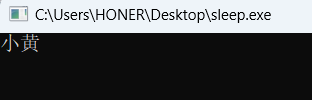
但是呢,如果我们再引入一个自定义函数mousecout.check("文字"),就会变成这样:

它会生成出一个可点击按钮,点击以后就可以输出“666”
int main(){
	mousecout<<"小黄";
	while(1){
		if(mousecout.check("小黄")){
			cout<<"666";
			break;
		}
		Sleep(50);
	}
	return 0;
}
是不是很神奇?
这段代码中, mousecout.check("小黄") 的作用是检测按键“小黄”是否被按下,如果是,就输出666,否则就继续
mousecout 函数总结
一、核心特性
-
流式输出
语法类似cout,使用<<运算符输出文本,同时自动将输出的内容注册为一个可点击的“按钮”。 -
鼠标悬浮高亮
当鼠标移动到按钮区域时,文本颜色自动变为原颜色×16(高亮),移开后恢复原色。 -
点击检测与防抖
内置防抖机制(默认 200ms),避免一次点击被多次触发。支持启用/禁用防抖。 -
自动状态更新
无需手动调用更新函数,check系列方法内部会自动以固定间隔(默认 50ms)检测鼠标位置和点击状态。 -
按钮区域自动计算
输出时会记录按钮的起始行列、结束行列(支持换行),无需手动指定坐标。
二、主要成员函数
| 函数 | 说明 |
|---|---|
mousecout << "文本" |
输出文本并注册为一个按钮(颜色默认白色) |
mousecout.setColor(颜色) |
设置按钮的颜色(可链式调用) |
mousecout.check("文本") |
检查指定文本的按钮是否被点击,返回 bool,点击后自动清除标记 |
mousecout.checkAny() |
返回被点击的按钮文本,若无点击返回空字符串 |
mousecout.checkMultiple(vector<string>) |
批量检测,返回被点击按钮在 vector 中的索引,否则 -1 |
mousecout.clearButtons() |
清除所有按钮(恢复原始显示) |
mousecout.refresh() |
强制刷新所有按钮显示 |
mousecout.update() |
手动强制更新鼠标状态(一般不需要) |
mousecout.setDebounceDelay(毫秒) |
设置防抖延迟 |
mousecout.setDebounce(bool) |
启用/禁用防抖 |
mousecout.setCheckInterval(毫秒) |
设置自动检测的时间间隔 |
mousecout.hasButton("文本") |
检查某按钮是否存在 |
mousecout.getButtonCount() |
返回按钮数量 |
pdbj(第几行,第几列,检测行,检测列,字体颜色,"字体") |
在固定行列输出和检测,输出内容和mousecout一样也是按钮,这个函数返回的是bool值,可直接判断按钮是否被点击,总体不如mousecout |
除了前三个函数,其它函数都不常用,无需理会
最后上代码!
namespace dj {
	inline void cd(int x) {
		Sleep(x);
		system("cls");
	}
	bool axj(long long key) {
		return (GetKeyState(key) < 0);
	}
	struct hl {
		long long h,l;
	};
	void de(int x) {
		SetConsoleTextAttribute(GetStdHandle(STD_OUTPUT_HANDLE), x);
	}
	bool ax(long long key) {
		return (GetKeyState(key) < 0);
	}
	hl wz(bool x = 1, bool n = 1) {
		HANDLE hOutput = GetStdHandle(STD_OUTPUT_HANDLE);
		HWND h = GetConsoleWindow();
		hl hl;
		POINT p;
		if (x) {
			GetCursorPos(&p);
			ScreenToClient(h, &p);
		} else {
			GetCursorPos(&p);
		}
		if (n) {
			CONSOLE_FONT_INFO consoleCurrentFont;
			GetCurrentConsoleFont(hOutput, FALSE, &consoleCurrentFont);
			if (consoleCurrentFont.dwFontSize.X > 0 && consoleCurrentFont.dwFontSize.Y > 0) {
				p.x /= consoleCurrentFont.dwFontSize.X;
				p.y /= consoleCurrentFont.dwFontSize.Y;
			}
		}
		hl.h = p.y + 1;
		hl.l = p.x + 1;
		return hl;
	}
	void ycbj() {
		HANDLE hStdin = GetStdHandle(STD_INPUT_HANDLE);
		DWORD mode;
		GetConsoleMode(hStdin, &mode);
		mode &= ~ENABLE_QUICK_EDIT_MODE;
		SetConsoleMode(hStdin, mode);
	}
	void ycgb() {
		CONSOLE_CURSOR_INFO cursor;
		cursor.bVisible = FALSE;
		cursor.dwSize = sizeof(cursor);
		HANDLE handle = GetStdHandle(STD_OUTPUT_HANDLE);
		SetConsoleCursorInfo(handle, &cursor);
	}
	inline void ydgb(long long h, long long l) {
		COORD pos = { (SHORT)(l - 1), (SHORT)(h - 1) };
		HANDLE hOut = GetStdHandle(STD_OUTPUT_HANDLE);
		SetConsoleCursorPosition(hOut, pos);
	}
	inline void getCursorPos(int &y, int &x) {
		CONSOLE_SCREEN_BUFFER_INFO csbi;
		GetConsoleScreenBufferInfo(GetStdHandle(STD_OUTPUT_HANDLE), &csbi);
		y = csbi.dwCursorPosition.Y + 1;
		x = csbi.dwCursorPosition.X + 1;
	}
	static bool lastClickState = false;
	static DWORD lastClickTime = 0;
	const DWORD DEBOUNCE_DELAY = 200;
	void resetClickState() {
		lastClickState = false;
		lastClickTime = 0;
	}
	bool pdbj(int y, int x, int x1, int x2, int ys, string zt, bool needDebounce = true) {
		ycgb();
		ycbj();
		hl z = wz(1, 1);
		bool a = 0;
		int oldY, oldX;
		getCursorPos(oldY, oldX);
		ydgb(y, x);
		if(z.h == y && z.l >= x1 && z.l <= x2) {
			de(ys * 16);
			cout << zt;
			de(ys);
			if(needDebounce) {
				bool currentClick = axj(VK_LBUTTON);
				DWORD currentTime = GetTickCount();
				if(currentClick && !lastClickState && (currentTime - lastClickTime) > DEBOUNCE_DELAY) {
					a = 1;
					lastClickTime = currentTime;
				}
				lastClickState = currentClick;
			} else {
				if(axj(VK_LBUTTON)) a = 1;
			}
		} else {
			de(ys);
			cout << zt;
			if(needDebounce && !axj(VK_LBUTTON)) {
				lastClickState = false;
			}
		}
		ydgb(oldY, oldX);
		de(15);
		return a;
	}
	class MouseCout {
		private:
			struct ButtonInfo {
				int startY, startX;
				int endY, endX;
				string text;
				int color;
				bool isHover;
				DWORD lastClickTime;
				bool lastClickState;
				bool clicked;
			};
			vector<ButtonInfo> buttons;
			HANDLE hConsole;
			bool autoDebounce;
			DWORD debounceDelay;
			DWORD lastCheckTime;
			int checkInterval;
			void getMouseCharPos(int &y, int &x) {
				hl pos = wz(1, 1);
				y = pos.h;
				x = pos.l;
			}
			int findButton(const string& text) {
				for(int i = 0; i < buttons.size(); i++) {
					if(buttons[i].text == text) {
						return i;
					}
				}
				return -1;
			}
			void autoUpdate() {
				DWORD currentTime = GetTickCount();
				if(currentTime - lastCheckTime < checkInterval) {
					return;
				}
				lastCheckTime = currentTime;
				int mouseY, mouseX;
				getMouseCharPos(mouseY, mouseX);
				for(int i = 0; i < buttons.size(); i++) {
					ButtonInfo& btn = buttons[i];
					bool isInside = (mouseY >= btn.startY && mouseY <= btn.endY &&
					                 mouseX >= btn.startX && mouseX <= btn.endX);
					if(isInside) {
						if(!btn.isHover) {
							ydgb(btn.startY, btn.startX);
							de(btn.color * 16);
							cout << btn.text;
							de(btn.color);
							btn.isHover = true;
						}
						if(autoDebounce) {
							bool currentClick = axj(VK_LBUTTON);
							if(currentClick && !btn.lastClickState &&
							        (currentTime - btn.lastClickTime) > debounceDelay) {
								btn.clicked = true;
								btn.lastClickTime = currentTime;
							}
							btn.lastClickState = currentClick;
						} else {
							if(axj(VK_LBUTTON)) {
								btn.clicked = true;
							}
						}
					} else {
						if(btn.isHover) {
							ydgb(btn.startY, btn.startX);
							de(btn.color);
							cout << btn.text;
							btn.isHover = false;
						}
						if(autoDebounce && !axj(VK_LBUTTON)) {
							btn.lastClickState = false;
						}
					}
				}
			}
		public:
			MouseCout(bool debounce = true, DWORD delay = 200, int interval = 50) {
				hConsole = GetStdHandle(STD_OUTPUT_HANDLE);
				autoDebounce = debounce;
				debounceDelay = delay;
				checkInterval = interval;
				lastCheckTime = 0;
				ycgb();
				ycbj();
			}
			MouseCout& operator<<(const string& text) {
				int currentY, currentX;
				getCursorPos(currentY, currentX);
				ButtonInfo btn;
				btn.startY = currentY;
				btn.startX = currentX;
				btn.text = text;
				btn.color = 15;
				btn.isHover = false;
				btn.lastClickTime = 0;
				btn.lastClickState = false;
				btn.clicked = false;
				int textLen = text.length();
				int lines = 1;
				int lastLineLen = textLen;
				for(int i = 0; i < textLen; i++) {
					if(text[i] == '\n') lines++;
				}
				btn.endY = currentY + lines - 1;
				size_t lastNewLine = text.rfind('\n');
				if(lastNewLine != string::npos) {
					lastLineLen = textLen - lastNewLine - 1;
				}
				btn.endX = currentX + lastLineLen;
				cout << text;
				buttons.push_back(btn);
				return *this;
			}
			MouseCout& operator<<(int value) {
				stringstream ss;
				ss << value;
				return operator<<(ss.str());
			}
			MouseCout& operator<<(char value) {
				stringstream ss;
				ss << value;
				return operator<<(ss.str());
			}
			MouseCout& operator<<(long long value) {
				stringstream ss;
				ss << value;
				return operator<<(ss.str());
			}
			MouseCout& operator<<(unsigned int value) {
				stringstream ss;
				ss << value;
				return operator<<(ss.str());
			}
			MouseCout& operator<<(ostream& (*manip)(ostream&)) {
				cout << manip;
				return *this;
			}
			MouseCout& setColor(int color) {
				if(!buttons.empty()) {
					buttons.back().color = color;
					de(color);
				}
				return *this;
			}
			bool check(const string& text) {
				autoUpdate();
				int idx = findButton(text);
				if(idx == -1) return false;
				if(buttons[idx].clicked) {
					buttons[idx].clicked = false;
					return true;
				}
				return false;
			}
			string checkAny() {
				autoUpdate();
				for(int i = 0; i < buttons.size(); i++) {
					if(buttons[i].clicked) {
						buttons[i].clicked = false;
						return buttons[i].text;
					}
				}
				return "";
			}
			int checkMultiple(const vector<string>& texts) {
				autoUpdate();
				for(int i = 0; i < texts.size(); i++) {
					int idx = findButton(texts[i]);
					if(idx != -1 && buttons[idx].clicked) {
						buttons[idx].clicked = false;
						return i;
					}
				}
				return -1;
			}
			void clearButtons() {
				for(int i = 0; i < buttons.size(); i++) {
					ButtonInfo& btn = buttons[i];
					if(btn.isHover) {
						ydgb(btn.startY, btn.startX);
						de(btn.color);
						cout << btn.text;
					}
				}
				buttons.clear();
			}
			void refresh() {
				for(int i = 0; i < buttons.size(); i++) {
					ButtonInfo& btn = buttons[i];
					ydgb(btn.startY, btn.startX);
					de(btn.color);
					cout << btn.text;
				}
			}
			void update() {
				autoUpdate();
			}
			void setDebounceDelay(DWORD delay) {
				debounceDelay = delay;
			}
			void setDebounce(bool enable) {
				autoDebounce = enable;
			}
			void setCheckInterval(int interval) {
				checkInterval = interval;
			}
			int getButtonCount() {
				return buttons.size();
			}
			bool hasButton(const string& text) {
				return findButton(text) != -1;
			}
	};
	MouseCout mousecout(true, 200, 50);
};
using namespace dj;
使用方法:
先将上面的代码复制下来,放到 using namespace std; 下方,注意头文件
#include <bits/stdc++.h>
#include <windows.h>
using namespace std;
namespace dj {
	inline void cd(int x) {
		Sleep(x);
		system("cls");
	}
	bool axj(long long key) {
		return (GetKeyState(key) < 0);
	}
	struct hl {
		long long h,l;
	};
	//剩余部分...
随后你就可以在主函数部分随意使用mousecout了
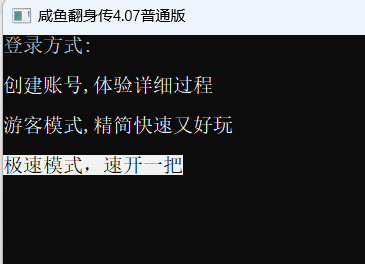
这个函数很适合做游戏!
2.sleepcout
sleepcout,俗名 睡觉输出 停顿输出
我们的cout都是一输出就立马显示,而sleepcout不是,它是逐字输出,类似于打字机
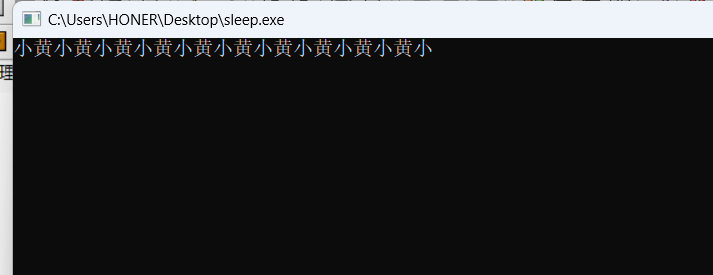
int main(){
	sleepcout<<"小黄小黄小黄小黄小黄小黄小黄小黄小黄小黄小黄小黄小黄小黄小黄小黄小黄小黄小黄小黄";
	return 0;
}
相比起mousecout,sleepcout就简单的多,只有两个函数
-
sleepcout<<"文本";
停顿输出文本,默认停顿时间为10ms
-
sleepcout.speed(停顿时间)<<"文本";
以特定速度输出文本,单位为ms
例:
int main(){
	sleepcout.speed(1000)<<"小黄小黄小黄小黄小黄小黄小黄小黄小黄小黄小黄小黄小黄小黄小黄小黄小黄小黄小黄小黄";
	return 0;
}
既每两个字之间相隔1000ms(1000ms=1s)
最后,上代码!
namespace sleep_display {
	class SleepCout {
		private:
			int delay_ms = 10;
		public:
			SleepCout& speed(int ms) {
				delay_ms = ms;
				return *this;
			}
			template<typename T>
			SleepCout& operator<<(const T& value) {
				std::ostringstream oss;
				oss << value;
				std::string str = oss.str();
				for (size_t i = 0; i < str.size(); ++i) {
					std::cout << str[i] << std::flush;
					Sleep(delay_ms);
				}
				return *this;
			}
			SleepCout& operator<<(std::ostream& (*manip)(std::ostream&)) {
				manip(std::cout);
				return *this;
			}
	};
	SleepCout sleepcout;
}
using sleep_display::sleepcout;
用法和mousecout一样
先将上面的代码复制下来,放到 using namespace std; 下方,注意头文件
#include <bits/stdc++.h>
#include <windows.h>
using namespace std;
namespace sleep_display {
	class SleepCout {
		private:
			int delay_ms = 10;
		public:
			SleepCout& speed(int ms) {
				delay_ms = ms;
				return *this;
			}
            //剩余部分...
随后你就可以在主循环里随意使用sleepcout了!
不要再用你的老爷cout了!